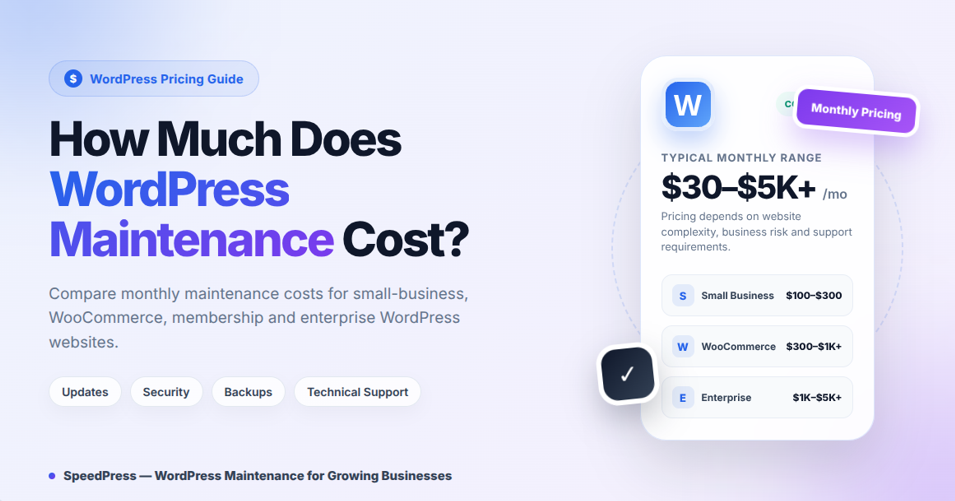
WordPress maintenance cost between $30 and $5,000+ per month, depending on the website type, technical complexity, traffic, and support requirements. A small-business WordPress site usually costs $100–$300 per month, while membership and more complex business websites may cost $150–$500+ per month.
Meanwhile, standard WooCommerce maintenance typically costs $300 to $1,000+ per month. More advanced WooCommerce retainers range from $500 to $3,000+ per month, while enterprise or custom WordPress support may cost $1,000 to $5,000+ per month.
However, these are marketplace ranges rather than set industry prices. Ultimately, the real cost of keeping your WordPress site running depends on the complexity of the website, how valuable it is to the business, its traffic level, and any custom code or support included in the plan.
WordPress Maintenance Cost: Quick Pricing Guide
| Service level | Typical cost | Best for |
|---|---|---|
| DIY maintenance | $0–$50 per month, excluding time | Personal blogs and low-risk websites |
| Basic automated maintenance | $30–$50 per month | Small brochure websites |
| Professional WordPress maintenance | $100–$300 per month | Small business and lead-generation sites |
| Business or membership maintenance | $150–$500+ per month | Membership sites and established business websites |
| Staging-tested professional maintenance | $240–$1,000+ per month | Established and complex business websites |
| WooCommerce maintenance | $300–$1,000+ per month | Standard revenue-generating stores |
| Advanced WooCommerce retainer | $500–$3,000+ per month | Complex or high-volume ecommerce stores |
| Enterprise or custom WordPress support | $1,000–$5,000+ per month | High-traffic or mission-critical websites |
| Freelance WordPress support | $50–$150 per hour | Occasional fixes and development |
| Agency WordPress support | $100–$250 per hour | Complex or urgent technical work |
Overall, based on publicly listed provider prices and common market ranges, personal sites may cost $0–$50 per month. Similarly, small-business websites may cost $100–$300 per month, while business or membership sites may cost $150–$500+ per month.
In addition, standard ecommerce maintenance may cost $300–$1,000+ per month. Meanwhile, advanced WooCommerce retainers may cost $500–$3,000+ per month.
Furthermore, this wide range is supported by public provider prices checked on July 16, 2026. For instance, WP Buffs lists its Maintain, Protect, Perform, and Custom plans at $89, $179, $239, and $359 per month.
Similarly, SiteCare lists its Gold plan at $435 per month and its Diamond plan at $2,190 per month. Furthermore, Codeable offers Basic Maintenance for $240–$280 per month, Advanced Maintenance for $590–$670 per month, and Enterprise Maintenance starting at $1,000 per month.
In practice, public provider prices are useful benchmarks. However, they are not direct equivalents because included hosting, development time, update testing, security remediation, and response times vary.
Therefore, SpeedPress grouped the ranges in this guide by service level and the technical workload, business risk, custom-code dependency, transaction risk, traffic level, and response time usually involved.
Pricing Sources and Methodology
Accordingly, the pricing ranges in this guide are benchmarks, not fixed industry rates. Specifically, they were developed by comparing publicly listed maintenance packages with the workload and risk factors explained throughout this article.
In addition, provider prices were checked on July 16, 2026.
Official pricing references:
- WP Buffs WordPress Care Plans
- SiteCare Plans and Pricing
- Codeable WordPress Maintenance Plans
Because providers bundle different combinations of hosting, development time, staging tests, security cleanup, monitoring, and response times, compare scope as carefully as price.
Otherwise, a cheaper plan may provide much less protection or support than expected.
What Is Included in WordPress Maintenance Costs?
More importantly, a WordPress maintenance service should be more than just clicking the update button. Instead, it should protect the website’s software, data, security, performance, and essential functionality.
Software Maintenance
- WordPress core updates
- Plugin and theme updates
- Compatibility testing
- Staging-site testing
- Update rollback procedures
- PHP and database compatibility checks
- Removing unnecessary or outdated plugins
Backup and Recovery
- Scheduled off-site backups
- Database and file backups
- Backup retention
- Restoration testing
- Emergency website recovery
A backup may exist without being fully reliable. Therefore, if nobody has verified that the backup can be restored successfully, it is only reliable to a point.
WordPress Security
- Malware scanning
- Vulnerability monitoring
- Firewall configuration
- Brute-force protection
- Administrator account audits
- File-change monitoring
- Security hardening
- Malware cleanup and recovery
Performance Maintenance
- Page-speed monitoring
- Cache configuration
- Content delivery network checks
- Image optimization
- Database cleanup
- Slow-query investigation
- Core Web Vitals monitoring
- Plugin performance audits
Technical Support
In particular, support may include the following, depending on your plan:
- Troubleshooting errors
- Fixing broken layouts
- Form and email-delivery testing
- WooCommerce checkout testing
- Small content changes
- Plugin configuration
- Hosting and DNS assistance
- Emergency support
However, always check the scope before selecting a plan. For example, tasks such as custom development, redesigns, premium licenses, SEO work, or more complex integrations might not be included in “unlimited support.”
What Affects WordPress Maintenance Costs?
How Website Type Affects Maintenance Pricing
For instance, a five-page company website is cheaper to run than a WooCommerce store with payment processing, customer accounts, inventory management, taxes, subscriptions, and transactional emails.
Likewise, membership sites, learning platforms, directories, booking systems, multilingual websites, and marketplaces need much more testing.
Number and Quality of Plugins
Additionally, each plugin adds another update cycle and potential compatibility risk.
However, having lots of plugins is not the only problem. In fact, ten reliable, well-maintained plugins may be safer than three aging and poorly developed ones.
Custom WordPress Maintenance Costs
In practice, custom code requires more careful maintenance. For example, updates may need:
- Git-based version control
- Code review
- Staging deployment
- Regression testing
- Database migration testing
- Manual quality assurance
Moreover, automated updates alone may be insufficient for sites with custom functionality. This is because updates often require staging, regression testing, and a rollback plan.
Traffic and Business Risk
Likewise, monitoring and support for a sales or lead-generating website need to be tighter and faster than for a hobby blog.
Therefore, the question is not only, “How expensive is maintenance?” Instead, it is also, “How much could every minute of downtime, lost orders, broken forms, or a security breach cost the business?”
Required Response Time
Less expensive plans generally provide assistance during ordinary business hours. By contrast, premium plans may offer one-hour response times, after-hours support, or 24/7 emergency assistance.
As a result, faster response times necessitate more engineering capacity and, typically, a higher monthly fee.
Hosting and WordPress Maintenance Expenses
For example, hosting-related problems may include:
- Slow response times
- Resource limits
- Failed backups
- Database errors
- Outdated server software
- Poor staging support
For this reason, managed WordPress hosting may include server-level backups, caching, and security. However, it does not automatically solve plugin conflicts, broken layouts, custom code issues, form and checkout failures, or technical SEO problems.
Monthly WordPress Maintenance vs Hourly Support
Choose a Monthly Plan When:
- Your business relies on affiliate revenue or leads from the website
- Updates must be tested regularly
- You need continuous uptime and security monitoring with scheduled or real-time backups based on how frequently the site’s data changes
- Downtime would damage the business
- You need predictable monthly costs
- You want one team responsible for the health of your website
Choose Hourly Support When:
- The website rarely changes
- You can safely handle regular updates yourself
- You need only occasional troubleshooting
- The website does not have much custom functionality
- Any short downtime period would have a much smaller negative effect
Generally, freelance WordPress developers currently charge $50–$150 per hour, while agencies often charge $100–$250 per hour.
In comparison, Codeable’s recommended expert rate is $80–$120 per hour, with a 17.5% service fee included in the final project price.
Hourly support can be suitable for websites that rarely need technical work. However, if many problems occur in one month, hourly support can get expensive.
Moreover, hourly support usually excludes proactive monitoring, scheduled backups, security scanning, and preventive maintenance unless these services are separately included.
Hidden WordPress Website Maintenance Costs
Confirm what is included in the price of a plan before buying one:
- Premium plugin licenses
- Theme renewals
- Hosting and CDN services
- Domain renewal
- Email-delivery services
- Malware cleanup
- Emergency restoration
- Development hours
- Content updates
- Accessibility remediation
- Technical SEO
- Speed optimization
- Major design or functionality changes
For instance, a plan may look inexpensive at first. However, it is not good value if every important task results in an extra bill.
How Much Should You Budget for WordPress Maintenance?
Mini Brochure Site: $30–$100 Monthly
Typically, this should include updates, backups, uptime monitoring, security checks, and some level of support.
However, complex fixes or custom development may still cost extra.
Business Website: $100–$300 per Month
Accordingly, a business plan should include human oversight, structured testing, performance reviews, reports, and technical troubleshooting.
In addition, the provider should have a clear process for handling failed updates or website errors.
Business or Membership Website: $150–$500+ per Month
Business and membership websites often involve user accounts, custom functionality, higher traffic, or premium integrations.
Therefore, they generally require staging tests, developer oversight, and more responsive support.
WooCommerce Store: $300–$3,000+ per Month
Standard WooCommerce maintenance commonly costs $300–$1,000+ per month.
Meanwhile, more advanced WooCommerce retainers typically range from $500 to $3,000+ per month, depending on store complexity.
More specifically, WooCommerce maintenance may require:
- Staging-tested updates
- Checkout testing
- Payment gateway monitoring
- Transaction-safe backups
- Order-email testing
- Inventory and subscription checks
- Faster emergency response
Because of these additional requirements, ecommerce maintenance generally costs more than maintenance for a standard business website.
Custom or High-Traffic WordPress Site: $1,000–$5,000+ per Month
Furthermore, testing, monitoring, development capacity, documentation, and structured deployment processes all have to be more extensive for custom applications.
Consequently, custom or mission-critical websites require a larger maintenance budget.
Instead of evaluating only the pages being worked on, SpeedPress assesses WordPress maintenance needs using technical workload analysis and business risk evaluation.
How SpeedPress Calculates WordPress Maintenance Pricing
Specifically, SpeedPress evaluates maintenance requirements using five practical factors:
- Update complexity: The number and quality of plugins, themes, integrations, and dependencies.
- Transaction and data-change risk: How often orders, payments, bookings, memberships, or form submissions change the database.
- Custom-code dependency: Whether the website relies on custom themes, plugins, APIs, or business logic.
- Traffic and business impact: How much downtime, slow performance, or broken functionality could cost the business.
- Required response time: Whether standard business-hour support is sufficient or faster emergency response is needed.
As a result, this approach helps match the maintenance plan to the website’s real workload and risk instead of choosing a plan only by price.
In other words, it prevents businesses from selecting a maintenance plan based only on the monthly cost.
Maintenance PlansHow to Compare WordPress Maintenance Plans and Pricing
Before choosing a provider, ask each company:
- Are updates tested on staging?
- Is a rollback point created before updates, and how does the provider protect new orders, form entries, and other database changes during restoration?
- How often are backups created?
- Are the backups stored outside the server?
- Is the restoration process tested?
- Is malware cleanup included?
- What is the support response time?
- Are development hours included?
- Are premium licenses included?
- Are forms and checkout functions tested?
- Will you receive maintenance reports?
- What work is outside the scope of the plan?
Above all, steer clear of providers that do not have clear guidelines for scope, exclusions, backup policies, testing processes, and response times.
Common WordPress Maintenance Mistakes
Updating Without a Reliable Backup
For example, an update can lead to PHP errors, database issues, layout shifts, or conflicts between plugins.
Therefore, always create a restorable backup and make sure changes can be reversed.
Relying Entirely on Automatic Updates
Similarly, automatic updates reduce some manual effort. However, they do not prove that pages, forms, integrations and checkout are still operating correctly.
Keeping Abandoned Plugins
Likewise, plugins that are no longer supported can leave you open to security and compatibility risks.
For this reason, swap them out before they become a crisis.
Making Changes on the Live Site
As a rule, crucial updates and custom-code modifications should not be tested directly on the live website.
Instead, they should be tested in a staging environment first.
Evaluating a Provider Only by Price
Overall, price matters, but it does not show the full value of a maintenance service.
Therefore, evaluate the testing, recovery, security, support, and engineering capabilities of the provider instead of focusing only on the monthly price.
WordPress Maintenance Checklist
Weekly :
- Review uptime and security alerts
- Apply tested updates
- Confirm backups completed successfully
- Test forms, navigation, and crucial pages
- Check for visible layout errors
Monthly :
- Review administrator accounts
- Scan for malware and vulnerabilities
- Test backup restoration
- Check site speed and Core Web Vitals
- Test for broken links, 404 errors and redirects
- Clean the database
- Remove unused software
Quarterly :
- Audit plugins, themes, PHP, and hosting
- Review premium licenses
- Test the website on popular browsers and mobile devices
- Review conversion paths
- Remove outdated integrations
- Address accumulated technical debt
Ultimately, SpeedPress takes a preventive engineering approach to WordPress maintenance. Therefore, updates, security, backups, performance, and technical support must work together.
Frequently Asked Questions
Is WordPress Maintenance Necessary?
Yes. WordPress websites rely on a range of technologies, from core software, themes, and plugins to databases, hosting, and third-party services.
Over time, this can lead to security vulnerabilities, update conflicts, slow performance, and broken functionality if changes are not managed.
Therefore, ongoing maintenance is necessary for most active WordPress websites.
Can I Maintain WordPress Myself?
If you know how to manage updates, backups, security, troubleshooting, and restoration, you can maintain a small and relatively low-risk website yourself.
Although DIY maintenance allows you to avoid service fees, it requires time and may involve technical risk.
Does Maintenance Come with Managed WordPress Hosting?
Only partly. For example, managed hosting may include infrastructure management, caching, server security, and backups.
However, it does not necessarily include plugin conflict resolution, custom code support, broken forms and emails, malware remediation, content changes, or technical SEO.
How Often Should WordPress Be Maintained?
In practice, monitoring should run continuously.
In addition, live websites typically require daily backups and a weekly review of all updates.
Finally, critical security vulnerabilities should be addressed as soon as possible.
How Much Should You Pay Each Month?
A typical small-business website generally requires a budget of $100–$300 per month.
Meanwhile, business or membership websites commonly cost $150–$500+ per month.
In addition, standard WooCommerce maintenance costs $300–$1,000+ per month, while advanced WooCommerce retainers range from $500–$3,000+ per month.
Finally, enterprise, custom, and high-risk WordPress websites may require $1,000–$5,000+ per month.