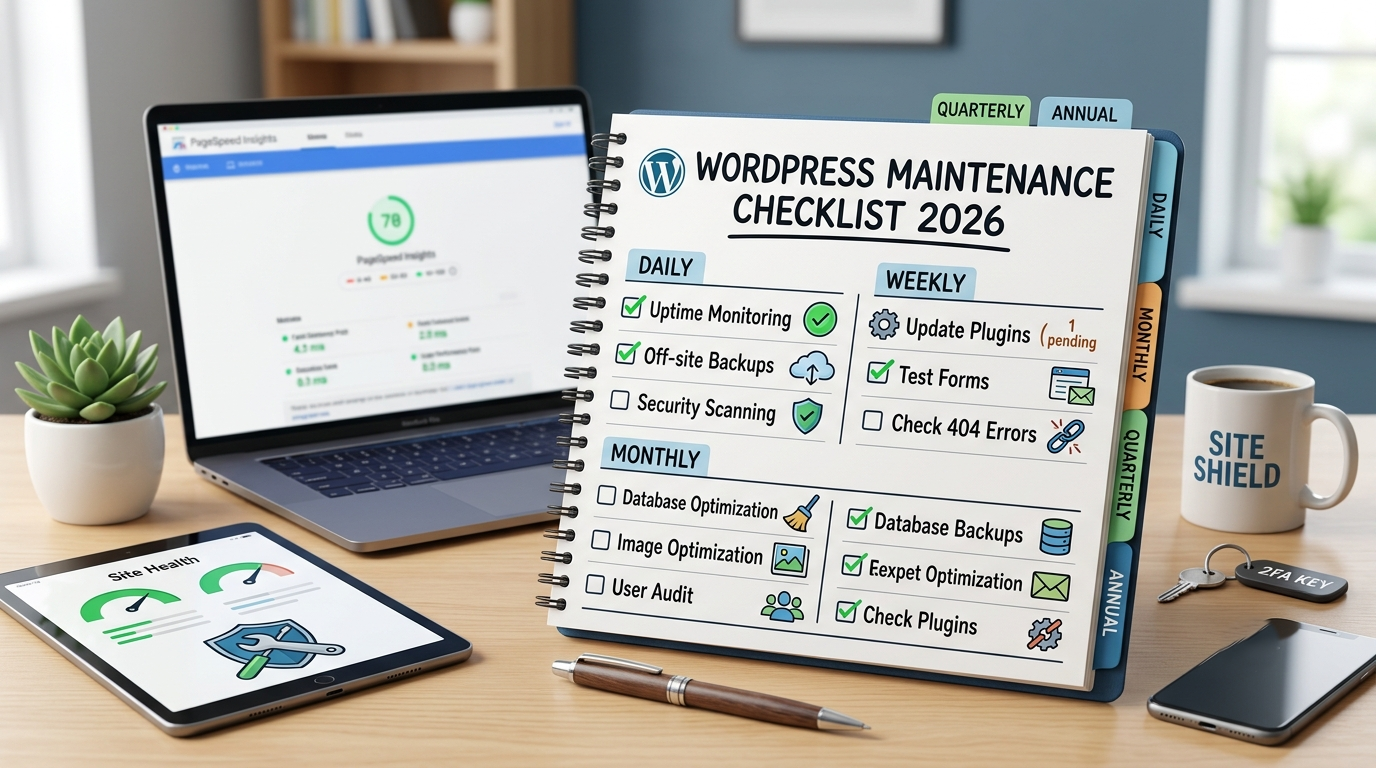
Maintaining a healthy website requires a systematic approach, and executing a complete wordpress maintenance checklist provides the ultimate solution to secure your digital presence, boost performance, prevent downtime, and safeguard your search rankings. A WordPress site is a dynamic stack of core software, themes, plugins, and hosting environments that require continuous care to work together seamlessly. Implementing structured daily, weekly, monthly, quarterly, and annual procedures helps you resolve vulnerabilities early, optimize database efficiency, and deliver an outstanding user experience that converts visitors into loyal clients.
Why Is a WordPress Maintenance Checklist Essential for Your Business Growth?
Running a digital platform without a wordpress maintenance checklist exposes your operations to compounded technical debt. Over time, unpatched plugins, database bloat, and broken links accumulate silent issues that tank your traffic and ruin conversion rates. When you establish routine health checks, you protect your digital investment from sudden crashes and expensive emergencies. Search engines like Google actively reward platforms that offer rapid page load times, secure connections, and reliable infrastructure. Regular upkeep directly improves your Experience, Expertise, Authoritativeness, and Trustworthiness (E-E-A-T) signals across search engines and AI generative engines. Visitors instantly trust a fast, bug-free site, which converts casual traffic into recurring business success.
What Daily Tasks Keep Your WordPress Website Operating Smoothly?
Daily routines act as your digital security perimeter, catching critical infrastructure glitches before your customers notice them. A proactive wordpress maintenance checklist ensures your server stays accessible and resilient against threats around the clock.
-
Uptime Monitoring: Track server availability in real time so you can resolve unexpected hosting outages immediately.
-
Automated Off-site Backups: Store complete site snapshots in isolated cloud repositories away from your primary host, guaranteeing full recovery if server failure occurs.
-
Malware and Vulnerability Scanning: Execute automated code reviews to detect unauthorized scripts, backdoor attempts, or compromised dependencies.
-
Security Log Audits: Review access logs to spot brute-force attacks, high-frequency failed logins, or suspicious administrative actions.
How Do Weekly WordPress Updates Protect Your Site from Security Threats?
Executing weekly updates on your wordpress maintenance checklist keeps your core software and extensions completely aligned. Outdated components remain the single largest vector for cyber exploits, making weekly maintenance your best line of defense.
-
System and Plugin Patches: Apply core updates alongside theme and plugin updates, making sure to generate a staging snapshot before deployment for safe rollbacks.
-
Form and Checkout Testing: Manually submit contact forms and run test transactions to ensure your lead generation and payment gateways function perfectly.
-
Broken Link Management: Scan for 404 errors across your content pages, fixing broken internal links to protect user journeys and search engine crawl budget.
-
Spam Comment Moderation: Clear out automated trackbacks and spam comments to keep your database lean and your brand identity professional.
Why Should You Perform Monthly Database and Speed Optimizations?
A monthly wordpress maintenance checklist review focuses on deep optimization, stripping away technical clutter that accumulates during everyday operations. Optimizing your database involves clearing post revisions, expired transients, and discarded drafts. At the same time, compressing media files into modern WebP or AVIF formats drastically cuts bandwidth usage and keeps mobile loading speeds lightning fast.
How Do Monthly Security Audits Guard Your Admin Dashboard?
Monthly administrative reviews ensure access privileges stay strictly controlled across your organization. Maintaining secure administrative standards on your wordpress maintenance checklist keeps unauthorized personnel away from your critical business data. Auditing user permissions allows you to remove stale staff accounts and demote users with unnecessary administrative privileges. Enforcing robust directory permissions ($755$ for directories and $644$ for files) protects file systems from malicious write access. Following current NIST guidelines, insist on strong passphrases at least 15 characters long, rotating them immediately if credential exposure occurs.
Why Are Quarterly Backup Restoration Tests Critical for Business Continuity?
A backup strategy remains an unverified theory until you successfully execute a full restore drill. Adding quarterly restoration checks to your wordpress maintenance checklist turns emergency recovery into a smooth, proven operational routine. Restoring a site backup to a completely isolated staging environment verifies that media libraries, user databases, and system configurations remain fully recoverable. This process uncovers hidden file corruption early, saving your company from catastrophic data loss during actual crisis events.
How Does Updating Your PHP Version Boost WordPress Performance?
Your PHP runtime engine forms the computational backbone of your entire WordPress framework. Elevating your environment to PHP 8.3 or higher delivers massive speed gains and reduces server resource usage. Older PHP versions reach end-of-life status and stop receiving vital security patches, leaving host servers vulnerable to modern exploit kits. Upgrading your server environment keeps execution speeds fast, optimizes server memory usage, and extends hardware longevity.
What Quarterly Audits Eliminate Bloat and Reduce Your Attack Surface?
Quarterly operational reviews give you an ideal opportunity to declutter your active WordPress configuration. Deactivating and completely removing unused extensions significantly closes potential entry points for attackers. Auditing software assets reduces system overhead and speeds up ongoing patch management. During this cycle, review your site against global legal compliance and accessibility standards, updating your privacy terms and fixing interface issues so every user enjoys a seamless experience.
How Do Yearly Audits Maximize Your Long-Term Search Engine Rankings?
Annual reviews align your technical infrastructure with long-term brand strategy. Incorporating yearly content and domain assessments into your wordpress maintenance checklist keeps your organic growth trajectory strong year after year. Conducting a comprehensive SEO audit via Google Search Console reveals high-performing pages that need content updates or technical polish. Cross-browser testing across modern desktop and mobile viewports confirms your brand delivers an optimal, high-converting visual experience everywhere.
Why Is Infrastructure Renewal Essential on an Annual Basis?
Managing domain registrations, SSL certificates, host contracts, and premium software licenses prevents accidental service disruptions. Keeping tracking systems updated avoids sudden outages that destroy brand credibility. Annual audits give teams a clear view of total operational costs and software licensing. Reviewing these services yearly ensures all paid assets actively contribute to your digital marketing growth and performance goals.
How Do 2026 Security Practices Redefine WordPress Site Maintenance?
Modern web security requires server-level protections and strict operational habits rather than simple security plugins. Enforcing SSH key-only access and mandatory two-factor authentication (2FA) creates powerful barriers against modern automated attack tools. Adopting the 3-2-1 backup strategy ensures ultimate data resilience: keep three copies of your data across two distinct media formats, storing at least one offsite copy. In an age of automated development, review all AI-generated code and plugin permissions manually before deploying changes to live production environments.
How Can Professional WordPress Maintenance Services Save Your Business Time?
Partnering with technical specialists guarantees your site receives expert attention without taking time away from your core business tasks. Professional engineering teams deliver proactive oversight, rapid issue resolution, and tailored performance upgrades. Our dedicated engineering team manages every tier of your site health stack around the clock. Contact us today via phone or email for a complete technical consultation, and let our specialists optimize, secure, and scale your WordPress presence.
FAQ
What happens if I ignore my WordPress maintenance tasks?
Skipping routine maintenance leads to severe technical debt, resulting in slower page speeds, broken site features, security breaches, and dropped search engine rankings.
How often should I create backups for my WordPress site?
E-commerce and active content platforms require continuous or daily automated off-site backups, while low-traffic brochure websites can run weekly off-site backups.
Can I automate my entire WordPress maintenance process?
While automated tools easily handle uptime monitoring, database backups, and basic scans, expert human oversight remains essential for update testing, security audits, and code reviews.
What is the ideal PHP version for WordPress in 2026?
Running your platform on PHP 8.3 or higher delivers optimal execution speed, improved memory efficiency, and up-to-date security patches.
Why do update updates sometimes break a WordPress website?
Updates can trigger code conflicts between themes, plugins, or core files. Always create a full backup and test updates on a staging site before applying them live.