How to Speed Up WordPress Site Performance for Maximum Conversions
To achieve sub-2-second load times on WordPress in 2026, you must optimize your site in a strict technical sequence: upgrade to managed cloud hosting with HTTP/3, configure full-page and Redis object caching, delay JavaScript execution while stripping unused CSS, convert media assets to AVIF, and conduct continuous database maintenance. Implementing this structured pipeline immediately eliminates performance bottlenecks, elevates your Core Web Vitals, and secures top search engine rankings.
What Causes a Slow WordPress Website ?
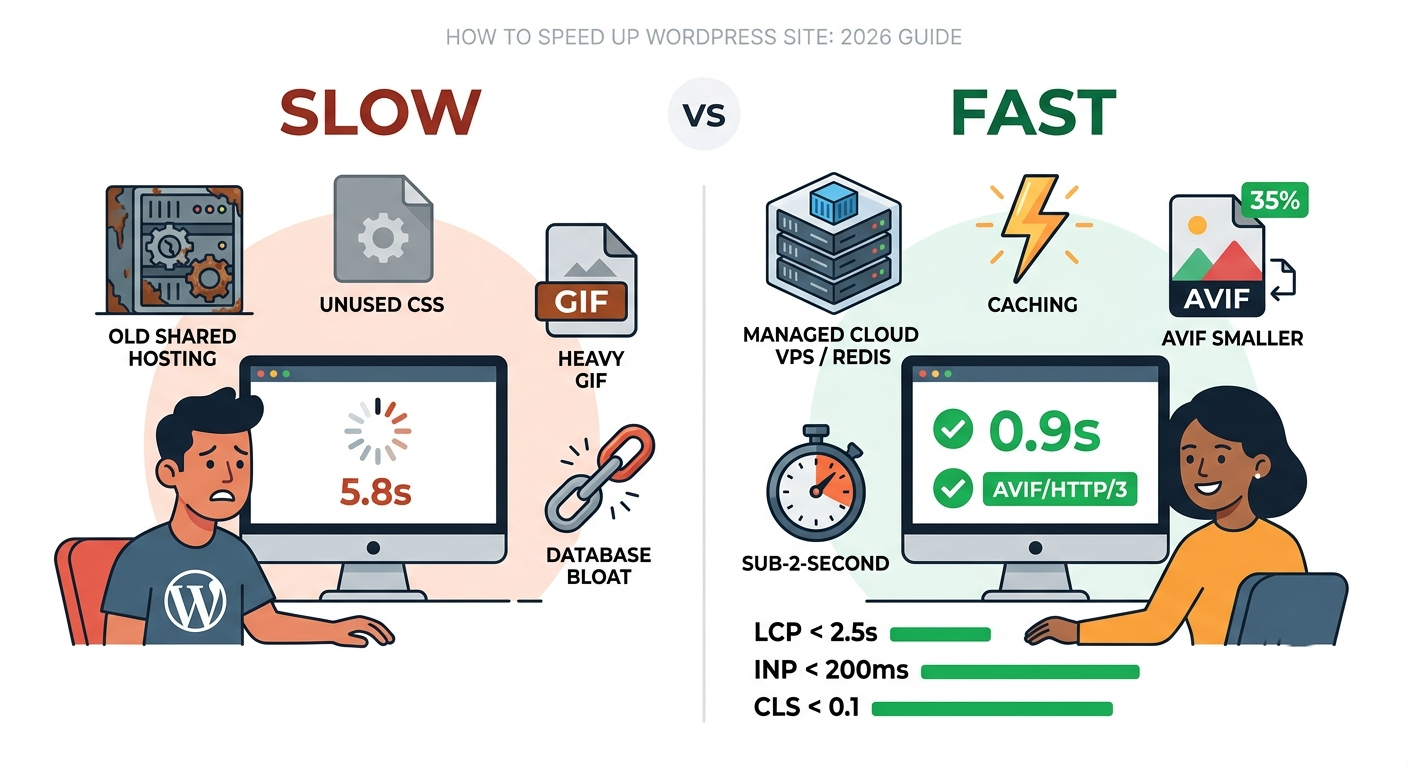
Imagine launching a high-converting campaign only to watch half your traffic bounce before your page even renders. Slow WordPress sites stem directly from foundational bottlenecks: outdated shared hosting environments, unoptimized heavy JavaScript assets, uncompressed media files, and redundant database queries. Modern web standards require every millisecond to count. When a visitor requests a page, your server must process PHP scripts, query the database, assemble HTML, and deliver stylesheet assets across the network. If any link in this dynamic chain lags, your user experience declines rapidly. Understanding how to speed up wordpress site architecture begins with identifying these core structural impediments.
Why Is Server Infrastructure the Foundation of Speed?
No software plugin or front-end trick can fix a fundamentally weak, underpowered server. Your hosting provider establishes the absolute ceiling for your site’s performance and execution speed. When your web host operates on overcrowded shared servers, your site constantly competes for CPU cycles and memory. Moving to dedicated resources guarantees that your application processes database operations instantly, creating a reliable baseline for sub-second response times.
How Do Managed Cloud VPS Hosts Transform Page Load Times?
Migrating from low-cost shared hosting to a managed Cloud VPS provider completely changes your execution environment. Containerized architecture isolates your resources, giving your database and kernel full processing power.
-
Raw Execution Power: High-performance engines optimize PHP execution at the hardware level, delivering two to eight times faster response speeds.
-
Modern PHP Engines: Upgrading to PHP 8.3+ instantly delivers a 15% to 30% speed improvement over older versions.
-
Edge Delivery: Utilizing HTTP/3 alongside edge caching solutions caches your complete HTML at global network edges, dramatically dropping Time to First Byte (TTFB) worldwide.
What Is the Ultimate Caching Strategy for WordPress Sites?
Caching removes the repetitive work of reassembling web pages for every single visit by storing ready-to-serve static snapshots.
| Caching Layer | Recommended Solution | Core Technical Benefit |
| Full-Page Caching | FlyingPress / LiteSpeed Cache | Serves pre-rendered static HTML directly to visitors. |
| Object Caching | Redis Server Engine | Stores complex database query results in RAM. |
| Edge Caching | Cloudflare APO | Delivers cached HTML from global server nodes close to the user. |
How Does Object Caching Accelerate Dynamic WooCommerce Database Queries?
Dynamic web applications like WooCommerce stores or membership portals cannot rely solely on static page caching because every user sees personalized cart data and account details. This is where Redis object caching excels. Redis operates as an in-memory database store that retains database query outputs directly in RAM. When a buyer views a product or updates a shopping cart, WordPress fetches the stored query instantly from memory rather than re-running heavy SQL requests against the physical database.
Why Must You Delay JavaScript Execution for Better INP Metrics?
Interaction to Next Paint (INP) measures how quickly your page responds visually when a user clicks, taps, or types. Unoptimized JavaScript bloat is the primary cause of poor INP scores on mobile devices. Delaying JavaScript execution prevents non-critical scripts—such as tracking pixels, analytics tags, live chat widgets, and social embeds from executing until the user explicitly interacts with the page (via scrolling or touching). By freeing up the main browser thread during initial page load, your site remains immediately responsive to user inputs.
How Do You Eliminate Unused CSS to Lighten Your Page Payload?
Traditional WordPress themes and page builders load massive external CSS stylesheets containing rules for elements that do not even exist on the active page. Modern asset optimization tools scan individual pages, identify active visual elements, and strip away unused style rules. Generating a clean, critical CSS file reduces your total stylesheet payload by up to 90%, speeding up visual parsing and stabilizing your layout.
How Should You Optimize Above-the-Fold Hero Images for LCP?
Largest Contentful Paint (LCP) measures when the primary content element on your screen becomes fully visible. Misconfigured image optimization often damages this metric. Standard lazy loading delays all off-screen images, but applying lazy loading to your main hero banner slows down rendering. You must explicitly exclude your above-the-fold hero banner from lazy loading and apply preloading tags in your HTML header. This tells the browser to fetch the primary visual immediately.
Why Is Regular Database Maintenance Vital for Long-Term Speed?
As your WordPress site grows, your database accumulates unused data, including post revisions, spam comments, expired transient options, and orphaned plugin settings. An bloated database slows down every internal query. Regularly cleaning post revisions and optimizing database tables with tools like WP-Optimize keeps your system lean. Additionally, auditing plugins with Query Monitor allows you to locate and deactivate extensions that trigger slow database calls.
What Is Digital Marketing Strategy and How Does Site Speed Drive Conversions?
A complete digital marketing strategy is an integrated, data-driven master plan designed to build brand authority, engage targeted audiences, and turn web traffic into active customers. Technical performance forms the baseline of this entire strategic ecosystem.
If your technical infrastructure lags, your acquisition campaigns suffer:
-
PPC Efficiency: Faster landing pages improve ad quality scores, lowering cost-per-click.
-
Search Engine Visibility: Google explicitly uses Core Web Vitals as direct ranking signals.
-
Conversion Rates: Every 100-millisecond delay in load speed reduces conversion rates.
Mastering how to speed up wordpress site performance ensures that every user who clicks your marketing channels encounters a fast, frictionless experience that converts.
How Can You Get a Free Consultation to Boost Your Performance?
Optimizing server settings, configuring Redis caching, fine-tuning asset execution, and maintaining sub-second speeds require precise technical execution. We specialize in high-performance WordPress optimization, server migration, and custom technical architecture tailored for modern businesses.
Ready to unlock sub-2-second load times? Contact us today to claim your free site speed consultation and performance audit.
FAQ
What is the recommended benchmark page load speed for WordPress in 2026?
The target benchmark is a sub-2-second total load time, with an Largest Contentful Paint (LCP) under 2.5 seconds, an Interaction to Next Paint (INP) under 200 milliseconds, and Cumulative Layout Shift (CLS) under 0.1 on mobile devices.
Will installing a speed plugin fix a slow hosting server?
No. Speed plugins optimize front-end assets and page caching, but they cannot overcome raw hardware limitations, slow server CPU speeds, or poorly configured hosting environments.
How does hosting fonts locally improve web performance?
Hosting fonts locally avoids external DNS lookup delays and prevents unexpected layout shifts, while setting font-display: swap ensures visible text renders instantly.
Why should hero images be excluded from lazy loading?
Hero images represent the main visual content above the fold (LCP). Excluding them from lazy loading and preloading them ensures they render immediately upon page arrival.
How often should WordPress database maintenance be performed?
Database cleanups should be automated to run weekly or monthly depending on site activity to remove expired transients, post revisions, and residual plugin data.