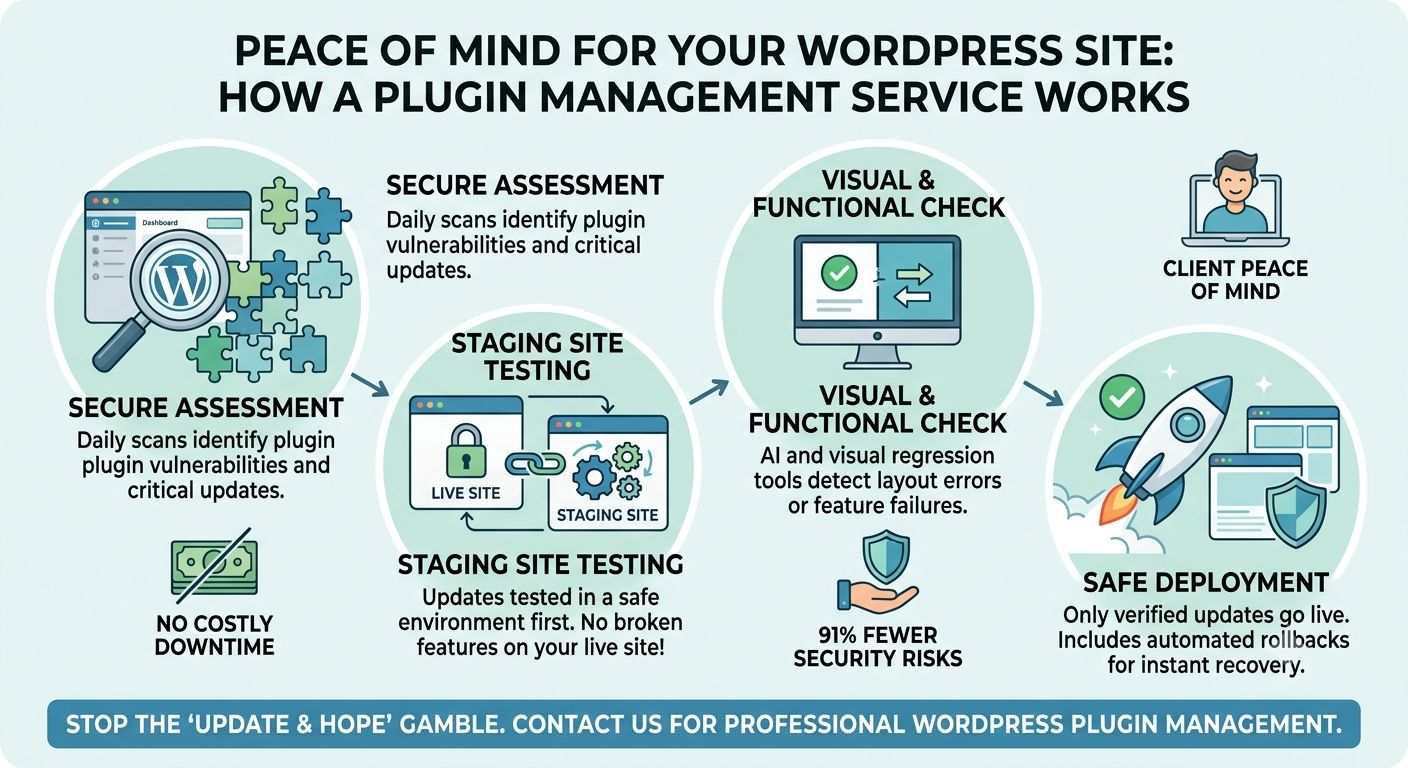
A professional WordPress plugin management service replaces the risky update and hope approach with automated safe update workflows. By combining risk-tiered scheduling, private staging environments, AI-driven visual regression testing, and automatic rollbacks, this service guarantees your website remains fully secure from vulnerabilities without ever breaking critical features or checkout pages.
Every website owner knows that terrifying moment of hesitation before clicking the “Update All” button. You stare at the screen, holding your breath, wondering if this simple click will silently crash your WooCommerce checkout page or trigger a fatal 500 server error. You are experiencing the dreaded “update and hope” gamble. Modern websites demand high-level technical oversight, and pushing updates manually across dozens of client sites is overwhelmingly labor-intensive. Conversely, relying on naïve automation letting standard auto-updates run wild without oversight gives you speed but absolutely no control. This trap forces developers into an uncomfortable middle ground: skipping essential patches that look too risky just to keep the lights on. Today, we will explore exactly how adopting a dedicated WordPress plugin management service permanently eliminates this anxiety, transforming chaotic maintenance into a frictionless, bulletproof system.
What Is the Secret Behind a Reliable WordPress Plugin Management Service?
A truly reliable WordPress plugin management service abandons blind automation in favor of intelligent, verifiable workflows. Instead of treating every piece of code equally, a premium service applies the exact right level of care to each update based on its specific risk profile. It transforms a guessing game into a structured science. By integrating staging environments, visual checks, and instant rollbacks, a high-quality management system ensures your site stays online, beautiful, and secure simultaneously.
Why Is the “Update and Hope” Gamble Devastating for Your Website?
Relying on luck during software updates is a devastating strategy for any mission-critical website. Standard WordPress auto-updates run strictly on a predetermined schedule, offering zero safety nets. They do not initiate automatic backups, they skip visual regression checks, and they completely lack the ability to control timing. If an update runs at 2:00 AM and crashes your e-commerce database, your store simply bleeds money until you wake up and fix it.
Where Do 91% of Catastrophic WordPress Security Vulnerabilities Hide?
Hackers rarely target the core WordPress software anymore. Recent data reveals that over 11,300 new vulnerabilities hit the ecosystem last year, and a staggering 91% of those threats were found exclusively within plugins. Your unique plugin stack is the primary gateway for unauthorized takeovers, malware injections, and cross-site scripting (XSS) attacks. Securing this massive attack surface requires constant vigilance, making a proactive management service mandatory for long-term survival.
How Does a Massive Lack of Visibility Silently Destroy Site Functionality?
The WordPress ecosystem features over 60,000 plugins built by thousands of independent development teams. Because nobody can test every single possible integration, your specific configuration is an entirely unique environment. When you lack visibility into how these distinct codes interact, conflicts become impossible to predict. You apply a simple update, and suddenly your contact forms stop sending emails, or your navigation menu completely vanishes from mobile devices.
Which Cascading Effects Make Manual Plugin Updates Extremely Dangerous?
Complex tools like page builders (Elementor, Divi) and massive e-commerce engines (WooCommerce) do not operate in isolation. Updating these heavyweights creates dangerous cascading effects that ripple across your entire infrastructure. Even if an update does not trigger a catastrophic PHP error, it can silently shatter your CSS styling or break third-party API connections. A professional WordPress plugin management service meticulously monitors these domino effects before they ever reach your live audience.
Who Truly Benefits from Moving Away from Naïve WordPress Auto-Updates?
Digital agencies, high-traffic publishers, and e-commerce store owners reap massive benefits from ditching naïve auto-updates. When you manage a portfolio of client sites or depend on uninterrupted digital revenue, you cannot afford acceptable downtime. By implementing controlled automation, developers reclaim hundreds of billable hours previously wasted on manual clicking and panicked troubleshooting, while business owners gain absolute peace of mind.
What Defines a Risk-Tiered Automated Safe Update Workflow?
Not all plugins demand the same level of paranoia. An effective management system categorizes your stack into distinct risk tiers. Low-risk tools, such as basic SEO extensions or simple widgets, update automatically without friction. Medium-risk tools like page builders require closer monitoring. Finally, high-risk assets such as payment gateways, checkout modifiers, and complex booking engines undergo rigorous staging tests. This tiered approach perfectly balances robust security with operational efficiency.
Why Are Staging Environments Absolute Lifesavers for High-Risk Plugins?
Never test new code on a live audience. A staging environment operates as a private, exact clone of your production website. Every professional workflow pushes high-risk updates to this staging site first. Here, technical changes execute in a sandbox, allowing your team to stress-test functionality, process mock payments, and verify layouts. If an update causes an explosion, it happens safely out of sight, leaving your live revenue stream completely untouched.
How Does Visual Regression Testing Catch Unintended Layout Breakages?
Modern management tools leverage artificial intelligence and visual regression testing (VRT) to monitor design integrity. Before initiating an update, the system captures high-definition screenshots of your most critical URLs. Immediately after the update, it captures a new set of images and compares them pixel-by-pixel. If a button shifts, an image disappears, or a font weight changes drastically, the VRT system instantly flags the visual breakage.
When Should Automatic Rollbacks Instantly Rescue Your Broken Website?
Speed is your best defense during a software failure. If an update triggers a server-level 500 error or fails a visual regression test, your WordPress plugin management service must feature an automatic rollback protocol. Within seconds of detecting the anomaly, the system automatically reverts the faulty plugin back to its previously stable version. Your visitors never experience the downtime, and your team receives a detailed error report to investigate safely during business hours.
How Can Strategic Scheduling Drastically Reduce Costly Downtime?
Updating your software during peak traffic hours is a recipe for disaster. A smart management strategy schedules routine maintenance during your site’s lowest traffic windows typically late at night or early Sunday mornings. Crucially, your team maintains the power to instantly override this schedule to force-apply critical zero-day security patches. This precise control maximizes site performance while minimizing the impact of necessary server reloads.
FAQ
1. What exactly is a WordPress plugin management service? It is a specialized solution that completely automates and secures the process of updating your website’s plugins. It uses staging environments, visual testing, and automatic rollbacks to ensure updates never break your site.
2. Why shouldn’t I just use the default WordPress auto-updates? Default auto-updates are “naïve.” They run without taking database backups, checking for layout breakages, or offering a safety net. If a default update breaks your site, it stays broken until you manually fix it.
3. How does visual regression testing work? The system takes a “before” screenshot of your web pages, applies the plugin updates, and takes an “after” screenshot. It then compares them pixel-by-pixel to guarantee no layouts, images, or buttons were visually broken during the update.
4. What happens if an update crashes my website? If a server error or visual defect is detected, the automated rollback system instantly restores the plugin to its previous working version, ensuring zero downtime for your visitors.
5. Does my WooCommerce store need a staging environment for updates? Absolutely. E-commerce sites rely on complex database interactions and high-risk payment gateways. A staging environment allows you to test updates and run test transactions privately before applying changes to your live store.
Contact with us for wordpress plugin management.